Google showed my videos 42,000 times last month and I had no idea
2026-08-29
Across my whole channel over the last 28 days, YouTube's own search sent me 12,510 views. Google sent 156.
Show me my traffic sources, search keywords and external sources
for the whole channel over the last 28 days.
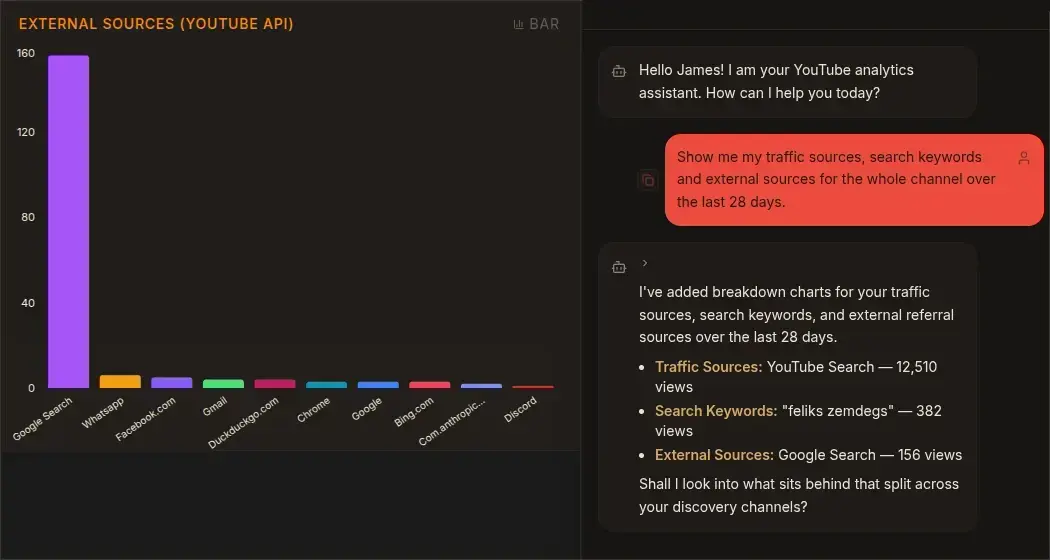
On those numbers Google is a rounding error and you would be right to ignore it. That is what I did for two years.
Then I connected the channel to Search Console and found out Google had put my videos in front of people 42,100 times in the same 28 days. Two hundred and thirty two of them clicked.

Forty two thousand impressions is more than three times the number of views YouTube's own search delivers. The demand was always there. The click was not, and neither was any way of knowing.
That changed in July. Google added platform properties to Search Console, and one of the four supported platforms is YouTube.
What actually landed
Search Console used to be a website tool. You verified a domain, and it told you which Google searches led people to your pages. If you did not have a website, it had nothing for you.
Platform properties change the unit. Instead of verifying a domain, you connect an account: Instagram, TikTok, X, or YouTube. Search Console then reports how that account's content performs in Google Search, plus Discover and Google News if your stuff shows up there.
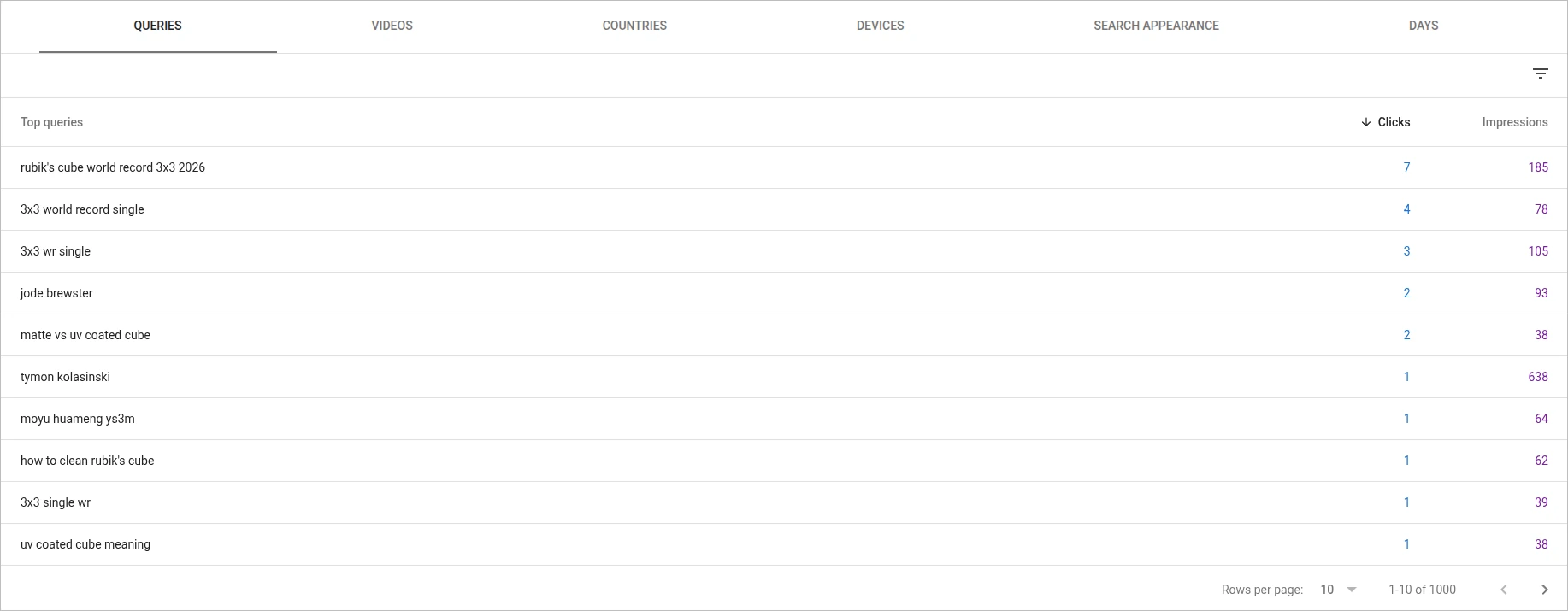
For a YouTube channel that means clicks, impressions, click-through rate, and average position, broken down by individual video. And the report that matters most: the actual search queries people typed into Google before they found your channel or a specific video.
It is free, it is part of Search Console, and connecting the channel takes about two minutes. Open the property selector, choose Add property, pick YouTube from the list, and follow the prompts.
The distinction that trips people up
Studio already has a search terms report. This is not that.
Studio's search terms are searches made on YouTube. Someone opens the YouTube app, types something into the YouTube search bar, and finds your video. That is on-platform search, and it shows up in Studio under YouTube search as a traffic source.
Search Console queries are searches made on Google. Someone types something into Google, gets a results page with a video carousel or a plain link, and clicks through to your video. That is external traffic, and it is the line that used to be a dead end.
Two different populations of people, with two different search habits, both landing on the same video. My own data makes the point better than the explanation does. The top search term bringing people to my channel from inside YouTube is "feliks zemdegs," worth 382 views. It does not appear anywhere in my top Google queries. Meanwhile "tymon kolasinski" shows up in both: about 80 views from YouTube search, and on Google, 638 impressions and exactly one click.
Same phrase, same two cubers, completely different behaviour depending on which search box it was typed into.
Joining it to the traffic sources chart
On its own the Search Console report is interesting. Sat next to your traffic sources data it is useful, because each side answers the half the other cannot.
Ask Tubient which videos your external traffic actually went to. You get a ranked list, Shorts and long-form kept separate, and you can see what that traffic did once it arrived: did it watch, did it subscribe, did it bounce.
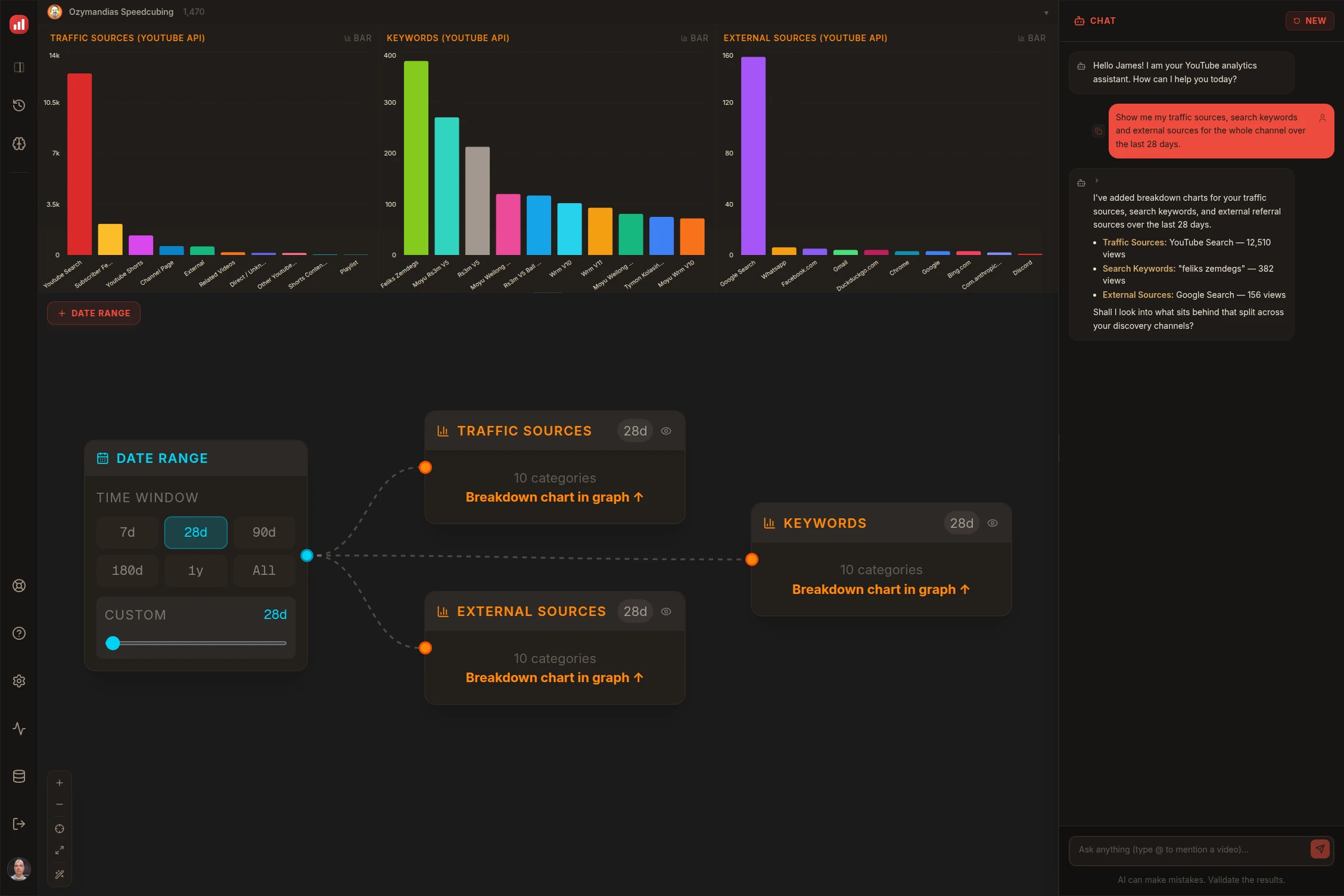
That is the whole pipeline: one date range node fanning out into three breakdowns. The external sources chart at the top of this post is one of them.
Then go to Search Console and add a filter for one of those video URLs. The tabs give you aggregates, all your queries and all your videos in ranked lists, which is useful for a general read but not for this. To tie queries to a specific video you have to filter down to that video's URL, then open the Queries tab. Now you have the full path. Someone searched a specific phrase on Google, clicked that video, watched sixty percent of it, and subscribed. Or searched something completely tangential, clicked, and left after nine seconds.
The first case tells you to make more of that video. The second tells you that ranking is not worth much and the video is being found by the wrong people.
The numbers will not match, and that is fine
Do not try to reconcile the totals. They are measuring different things.
My own two figures are 232 and 156, for what should be the same thing. Search Console counts a click when someone clicks your result on Google. YouTube counts a view when a playback threshold is met. A click that never becomes a view still counts as a click. A click that opens the video inside Google's own viewer also counts as a click, even though the person never landed on YouTube. Seventy six people somewhere in that gap.
The other gap is scope. Studio's External bucket covers everything off-platform: Reddit, Discord, someone's newsletter, a link in a forum post. Search Console only ever sees Google. So Search Console's number should be smaller than your External total, and if it is not, something else is going on.
Then there is the window. YouTube's reporting API runs two days behind, Google's runs a little further, and Tubient counts back from the most recent day it has. So two reports both labelled 28 days can sit a day or two apart at each end. Barely enough to matter, easily enough to stop you reconciling to the unit.
Treat the two as directional rather than reconcilable. The queries are the point. The counts are not.
Set it up before you need it
The one thing worth doing today, even if you have no immediate use for the report.
Data collection starts when you add the property. Charts stay empty for the first few days while metrics accumulate, and if the property is new your charts only cover the period since collection began. There is no backfill. Whatever happened on Google last month is gone as far as this report is concerned.
Which means the cost of waiting is not zero. Connect the channel now and in three months you will have three months of history to look at. Wait three months and you start from nothing.
Two other things to know. Ownership gets re-checked periodically, and if the connection lapses the reports pause until you re-verify, though your history survives and you do not have to wait for data to rebuild. And the feature only reports Google-side discovery. It says nothing about how your video performs on YouTube itself. That is still Studio's job, and Tubient's.
Where Tubient sits on this
Honestly: not automated yet.
Search Console has had an API for years, but it covers site properties. The platform property surface is a month old and there is no documented API access to it. So for now this is a manual pairing. You read the queries in Search Console, you ask Tubient what the traffic did, and you hold the two together yourself.
When Google opens it up, keyword data belongs inside Tubient, joined to the video it drove and the watch time it produced, on the same canvas as everything else. That is a much better answer than two browser tabs. It is on the list.
Until then, the two-tab version still beats what you had in June, which was a number next to the word Google and no way to interrogate it.
Tubient answers questions about your channel in plain English instead of handing you another dashboard. Free to try at tubient.io.
Further reading: Google's platform properties help page and its guide to analysing social and video content.