YouTube now counts the people on the couch: what TV co-views do to your views
2026-11-20
On 16 November 2026 YouTube announced it had changed what a view is again. If three people watch your video together on a living room TV, YouTube now estimates that and can count it as three views instead of one.
That's the third change to how views are counted in under two years. Shorts views changed in March 2025, long-form and live views started counting from the first frame on 27 August 2026, and now TV co-views. If you compare this month to last month, you're comparing slightly different things.
Here's what changed, what didn't, and how I'd read your numbers from here.
What changed
Before 16 November, one playback on a TV was one view, no matter how many people were on the couch. Now YouTube estimates how many people are watching and adds the extra viewers to your view count. YouTube calls those extra viewers co-views.
It's an estimate, not a head count. YouTube says it uses a model built by Google's research scientists, based on things like demographic patterns, the type of content and the time of day. It doesn't use cameras, microphones or device sensors.
A few things worth knowing:
- It's TV only. Phone, computer and tablet views still count one view per playback.
- It applies to every format. Long-form, Shorts and live streams all get co-views when they're watched on a TV.
- It isn't backdated. Your views before 16 November don't change. Co-views only get added to new TV views, including new views on old videos.
- It's everywhere. The public count under your video includes co-views, and so does the views number in YouTube Studio and in the YouTube APIs that tools like mine use.
What didn't change
Your earnings and YouTube Partner Program eligibility don't change. Those still run on engaged views, engaged watch hours and qualified views.
Engaged views don't include co-views. That matters, because it makes engaged views the one view number that's measured the same way on both sides of the change. I wrote about the difference between views and engaged views when the August change landed, in Views vs engaged views.
What it will do to your numbers
If a lot of your audience watches on TV, expect your views to step up from 16 November without anything about your audience actually changing. The more TV viewing you get, the bigger the step.
The knock-on effect catches people out. Anything worked out per view will step down at the same date, because the views underneath it grew and nothing else did. That includes your subscriber conversion rate (subscribers gained per view) and the share of your views that are engaged views. A drop in either around mid-November isn't necessarily your content. It may just be the counting.
If your channel is mostly watched on phones, you probably won't notice much at all.
How to see your views without co-views
YouTube added a metric called Co-view rate to YouTube Studio. It's in Insights, in Advanced Mode, under Device Type.
It's a ratio. A co-view rate of 1.10 means that for every 1,100 TV views, 1,000 were actual playbacks and 100 were estimated co-viewers. To get your views without co-views, divide your total views by the co-view rate.
For example, 22,000 TV views at a co-view rate of 1.10 is 20,000 views without co-views.
Don't treat it as a fixed number for your channel. YouTube says co-view rate varies by video, audience and region, and it can move as new views come in. So the figure you get without co-views is a good estimate, not an exact count.
The catch: co-view rate is only in YouTube Studio. It isn't in the YouTube APIs, so no outside analytics tool can show it to you, mine included. If you need the number without co-views, Studio is the only place to get it.
How Tubient handles it
Tubient pulls your numbers from the YouTube APIs, so from 16 November the views it shows include co-views, the same as Studio.
What I've added is a marker on every chart that crosses one of these counting changes. You'll see a yellow dashed line on the date, with a warning icon at the bottom. Hover over it and it tells you what changed on that day and what it affects.
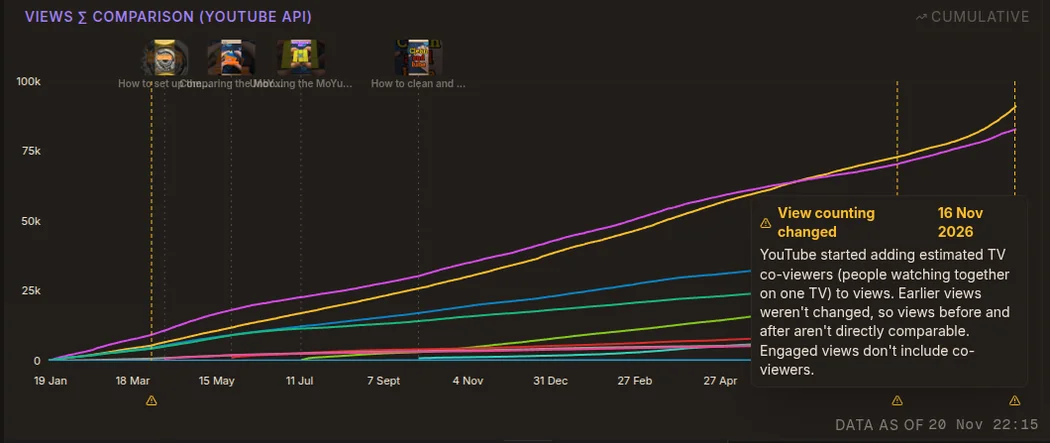
The AI analysis knows about all three dates too. When your date range crosses one, it's told so, and it won't describe a counting change as growth.
If you want a trend you can compare across all three dates, use engaged views.
The short version
- From 16 November 2026, views on TVs include an estimate of everyone watching together.
- Phone, computer and tablet views are unchanged, and older views weren't recalculated.
- Expect views to step up and per-view rates to step down on TV-heavy channels.
- Engaged views don't include co-views, so they're the stable number to compare across the date.
- Co-view rate in YouTube Studio is the only way to back co-views out.
Tubient answers questions about your channel in plain English instead of handing you another dashboard. Free to try at tubient.io.
Further reading: YouTube's announcement, Updating TV view counts to reflect your true audience: Introducing Co-view rate!, and its Help pages Understand your YouTube content performance and How engagement metrics are counted.